Installing Synology CSI Operator
Exploration
Spinning up and tearing down short-lived ephemeral deployments in my self-hosted kubernetes homelab has been a fun learning experience, but as I want to make some deployments more persistent, I need a way to provision long-lived storage.
A key requirement is that if node02 goes down and a pod is re-scheduled to a different node, the data stored needs to persist somewhere accessible by the other nodes.
Solution
I picked up a DS118 with a 2TB WD Red from eBay for a decent price.
There is a Synology Kubernetes Operator that can manage the provisioning of volumes for use by Kubernetes.
The repo contains a very good installation guide.
This solution meets all my requirements, providing some redundancy to my apps.
Synology Operator Installation
The full installation of the operator is very simple:
Ensure the Synology has at least one volume created
Clone the
synology-csirepoCopy
config/client-info-template.ymltoconfig/client-info.ymland fill out the Synology details:
clients:
  - host: <synology-ip>
    port: 5000
    https: false
    username: <synology-user>
    password: <synology-password>
- Configure some storage classes in
deploy/kubernetes/v1.20:
# storage-class.yaml

apiVersion: storage.k8s.io/v1
kind: StorageClass
metadata:
  name: synology-iscsi
  annotations:
    storageclass.kubernetes.io/is-default-class: "true"
provisioner: csi.san.synology.com
parameters:
  dsm: <synology-ip>
  location: "/volume1"
  protocol: iscsi
  fsType: ext4
reclaimPolicy: Delete
allowVolumeExpansion: true
---

# storage-class-retain.yaml

apiVersion: storage.k8s.io/v1
kind: StorageClass
metadata:
  name: synology-iscsi-retain
  annotations:
provisioner: csi.san.synology.com
parameters:
  dsm: <synology-ip>
  location: "/volume1"
  protocol: iscsi
  fsType: ext4
reclaimPolicy: Retain
allowVolumeExpansion: true
The default storage class will work out of the box, but remember it does not set the new Synology storage class as the default class to be used by the provisioner for any new volumes.
- Run the install script:
./scripts/deploy.sh run
- Verify everything installed okay:
(ins)❯ k get all -n synology-csi
NAME                             READY   STATUS    RESTARTS   AGE
pod/synology-csi-controller-0    4/4     Running   0          14h
pod/synology-csi-node-bhnzq      2/2     Running   0          14h
pod/synology-csi-node-bw2j7      2/2     Running   0          14h
pod/synology-csi-node-g9dfv      2/2     Running   0          14h
pod/synology-csi-node-j778m      2/2     Running   0          14h
pod/synology-csi-snapshotter-0   2/2     Running   0          14h

NAME                               DESIRED   CURRENT   READY   UP-TO-DATE   AVAILABLE   NODE SELECTOR   AGE
daemonset.apps/synology-csi-node   4         4         4       4            4           <none>          14h

NAME                                        READY   AGE
statefulset.apps/synology-csi-controller    1/1     14h
statefulset.apps/synology-csi-snapshotter   1/1     14h

~
(ins)❯ k get sc
NAME                       PROVISIONER             RECLAIMPOLICY   VOLUMEBINDINGMODE      ALLOWVOLUMEEXPANSION   AGE
local-path (default)       rancher.io/local-path   Delete          WaitForFirstConsumer   false                  32d
synology-iscsi (default)   csi.san.synology.com    Delete          Immediate              true                   13h
synology-iscsi-retain      csi.san.synology.com    Retain          Immediate              true                   13h

~
(ins)❯ k get secrets -n synology-csi
NAME                 TYPE     DATA   AGE
client-info-secret   Opaque   1      14h
Looking good!
Testing the Installation
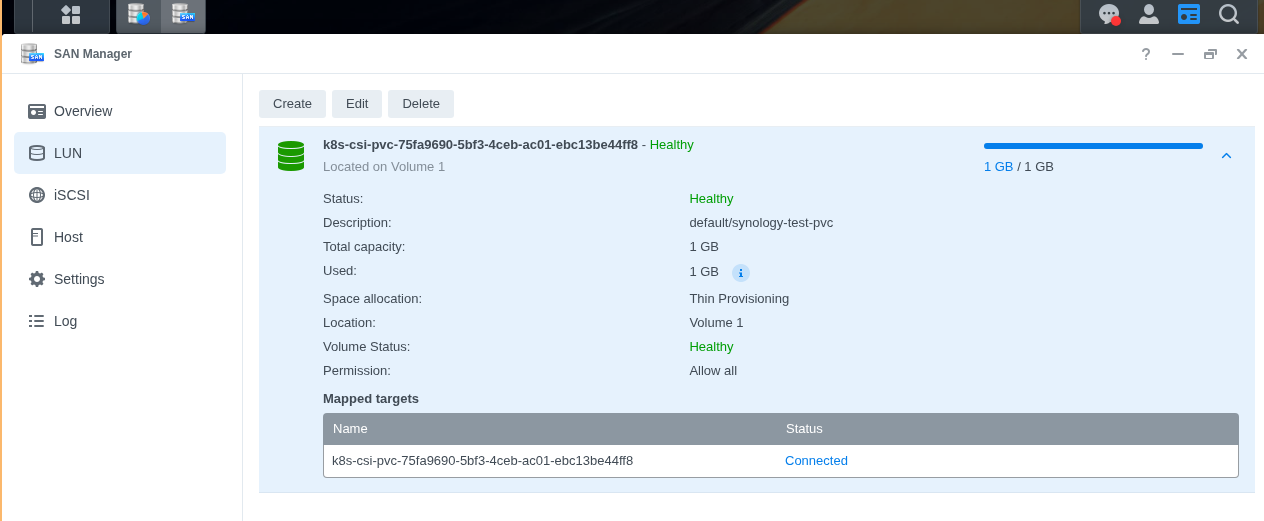
I used the following nginx deployment and pvc to test mounting a 1Gi volume provisioned by the operator:
# synology-test.yaml

apiVersion: v1
kind: PersistentVolumeClaim
metadata:
  name: synology-test-pvc
  namespace: default
  labels:
    app: synology-test-pvc
spec:
  storageClassName: synology-iscsi
  accessModes:
    - ReadWriteOnce
  resources:
    requests:
      storage: 1Gi
---
apiVersion: apps/v1
kind: Deployment
metadata:
  name: synology-test
  namespace: default
spec:
  replicas: 1
  selector:
    matchLabels:
      app: synology-test
  template:
    metadata:
      labels:
        app: synology-test
    spec:
      containers:
        - name: nginx
          image: nginx
          volumeMounts:
            - name: data
              mountPath: /usr/share/nginx/html
      volumes:
        - name: data
          persistentVolumeClaim:
            claimName: synology-test-pvc
Provisioned pvc:
(ins)❯ k get pvc
NAME                STATUS   VOLUME                                     CAPACITY   ACCESS MODES   STORAGECLASS     VOLUMEATTRIBUTESCLASS   AGE
synology-test-pvc   Bound    pvc-75fa9690-5bf3-4ceb-ac01-ebc13be44ff8   1Gi        RWO            synology-iscsi   <unset>                 50m
On the Synology UI:
Next Steps
Backups
The end-goal for backups is to remain outside of Synology DSM.
As most of the apps I will use and create will have cnpg databases, the plan is to point the backup and seed properties of cnpg clusters to Azure blob storage.
Cloud Native PostgreSQL Operator Integration
The next step for spinning up persistent deployments and creating cloud-native dotnet apps is creating postgresql databases with the Synology as the backing storage.
I will need to explore if the default storage class annotation is enough for any new cnpg cluster to use Synology operator volumes automatically.
FluxCD Integration
I chose not to bring synology-csi into flux just yet, as it is one of those deployments I would prefer manual control over due to its non-idempotent nature.
I have still defined the kustomization.yaml in case I decide to GitOps the Synology in the future.